


Apple 9L0-408 試験概要:
| 認定ベンダー: | Apple |
|---|---|
| 試験名: | Mac Integration Basics 10.8 試験 (Mac Integration Basics) |
| 試験番号: | 9L0-408 |
| 対応言語: | 英語 |
| 関連資格: | Apple Certified Support Professional (ACSP) macOS Support Essentials Mac管理 |
| 認定の有効期間: | 提供終了 / OSバージョン依存 (macOS 10.8世代) |
| 試験形式: | 多肢選択式, シナリオベース問題 |
| サンプル問題: | Apple 9L0-408 サンプル問題 |
| 受験方法: | 地域およびプログラムのステータスに応じて、認定テストセンター(従来はPearson VUE)またはApple認定試験配信プラットフォームを通じて実施 |
| 前提条件: | macOSの基本的な知識および一般的なコンピュータネットワークの概念に関する理解を推奨 |
| 公式シラバスのURL: | https://training.apple.com/ |
Apple 9L0-408 試験シラバストピック:
| セクション | 目標 |
|---|---|
| macOSの基本 | - macOSのインターフェイスとシステムナビゲーション - ユーザー、アカウント、およびシステム設定 |
| ネットワークと接続性 | - TCP/IPの基本とネットワーク設定 - Wi-FiおよびEthernetの設定 |
| システムのトラブルシューティング | - 接続問題の基本的なトラブルシューティング - アクセス権およびアクセスに関する問題 |
| ファイル共有とサービス | - macOSとWindowsシステム間のファイル共有 - SMBおよびAFPプロトコル |
| Windowsとの統合 | - 互換性および相互運用性ツール - Windowsネットワークおよび共有リソースへのアクセス |
Apple Mac Integration Basics 10.8 認定 9L0-408 試験問題:
問題 #1
What term best describes the OS X feature that restricts the system resources, such as files, that an application can access?
A. Execute disable
B. Sandboxing
C. Firewall
D. Library randomization
問題 #2
HOTSPOT
In the screenshot, click the Icon of the preference pane where you access the controls to encrypt the Mac hard disk.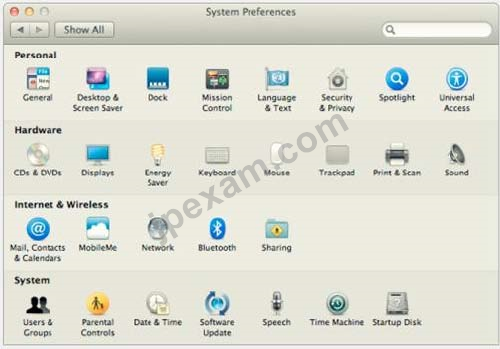
問題 #3
On a Mac, you are adding a new Mail account that will access an Exchange server. The server has Autodiscover enabled. What is the minimum information you need in order to add the account?
A. the Exchange email address and password
B. the Exchange email address
C. the Exchange email address and password, and the Exchange Server IP address or domain name
D. the Exchange email address and password, the Exchange Server IP address or domain name, and the Exchangeserver admin account name
問題 #4
HOTSPOT
In the screenshot below, click the icon of the preference pane where you configure a Mac to bind to an Active Directory server.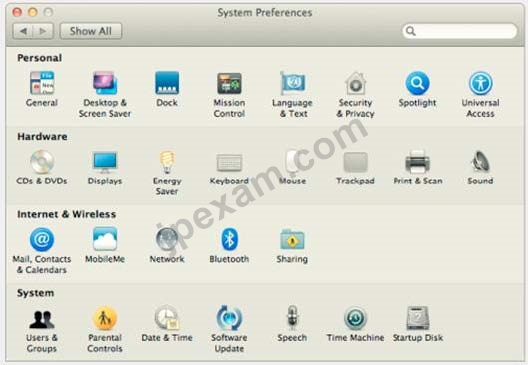
問題 #5
Two days ago you connected a new USB hard drive to your Mac. Which procedure will configure Time Machine to back up your data to the USB drive?
A. Drag the USB hard disk icon from the desktop onto the Time Machine icon in the Dock.
B. In System Preferences, click Time Machine, then click Select Disk, select the USB hard disk, and click "Use forBackup."
C. Drag the USB hard disk icon from the desktop onto the Time Machine icon in the /Applications/Utilities/ folder.
D. Click the Time Machine icon in the Dock, select the new USB hard disk as the backup destination, choose ZIP fromthe Backup Format list, and click Start.
解説:
| 問題 #1 正解: B | 問題 #2 正解: 会員のみ閲覧可能 | 問題 #3 正解: A | 問題 #4 正解: 会員のみ閲覧可能 | 問題 #5 正解: B |


 1137 お客様のコメント


 品質保証JPexamはIT認定試験のシラバスに従って、試験問題の範囲を正確に絞って、的中率が99%の最新問題集を捧げます。
 1年間の無料更新サービスJPexamは1年以内に問題集の無料更新サービスを提供し、お客様がいつでも最新版の問題集を持つことを保証いたします。もし試験の内容が変更されたら、弊社は直ちにお客様にお知らせします。それに、弊社の問題集が更新されたら、早速メールで最新バージョンを送付いたします。
 全額返金JPexamの問題集を利用すると、短時間で勉強しても試験に合格できるのを保証いたします。試験に不合格になってしまった場合、弊社は全額返金いたします。(
 ご購入前のお試しJPexamは問題集のサンプルを無料で提供いたします。ご購入前にサンプルを試用して製品の品質を確認することができます。ご遠慮なく利用してください。

